
Desktop ops for Roblox creators
Run your Roblox experiences from one window.
Publish places, watch your numbers, manage your groups, and enforce bans — through the official Roblox Open Cloud API and nothing else. Your keys stay encrypted on your machine.
200 OK { "versionNumber": 42 } ← place published
Getting started
Three steps to running
Free to install. Every module works read-only before you pay for anything.
Install the free app
One installer for Windows 10 and 11. All four modules open in Free mode — dashboards, history, and read access with no license.
Add an Open Cloud API key
Create one in the Roblox Creator Hub and paste it in. It's encrypted at rest with Windows DPAPI and only ever leaves as the x-api-key header on a call to apis.roblox.com. The app tells you which permissions each module needs — the docs walk through it.
Unlock Pro in the app
Buy the modules you want with a card or Litecoin, monthly or yearly or lifetime. Card checkout returns instantly; a Litecoin payment unlocks itself the moment it confirms on-chain.
Look inside
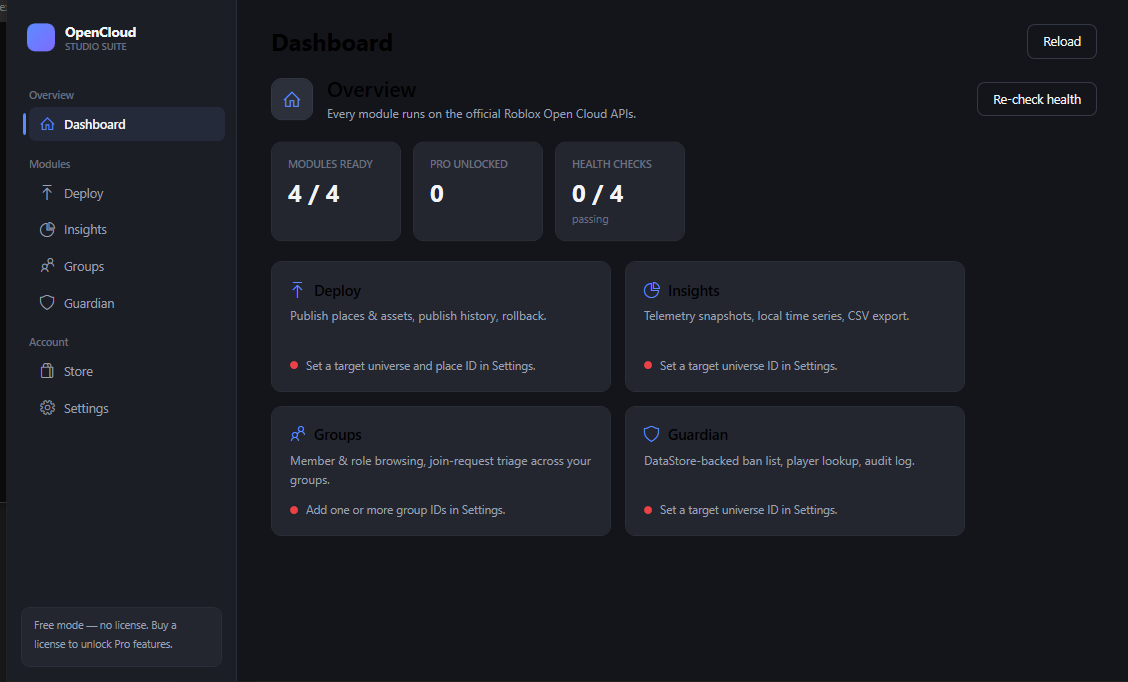
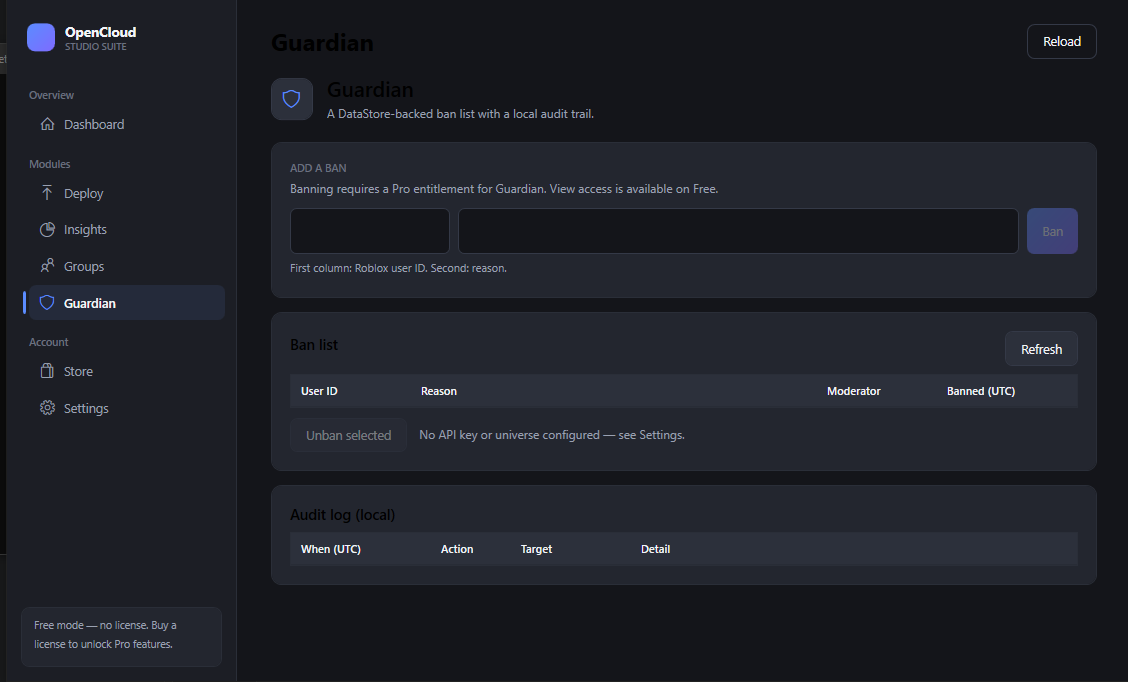
One window, every experience
The real app — a grouped nav rail, a live dashboard, and a page per module.
The modules
Four modules, one control room
Each is licensed on its own, or take the bundle.
Ship places without opening Studio
Publish or save a place file as a new version, and push a message to your live servers. Every publish is logged locally, so a rollback is just re-publishing a known-good file.
Free: view target & history · Pro: publish, save, roll back, message live servers
Your live numbers, kept over time
Snapshot the metrics your game writes to a telemetry DataStore into a local time series. See the delta since last snapshot, export CSV, or let it run on a timer.
Free: latest snapshot · Pro: full history, export, auto-snapshot
Members and join requests, no browser
Browse members and roles across every group you own. Accept or decline pending join requests in a click. (Roblox doesn't expose rank changes yet — those stay read-only.)
Free: one group, read-only · Pro: all groups, accept / decline
A ban list with an audit trail
Bans live in a DataStore your game reads on join; the app keeps a local, tamper-evident log of every action. Ships with the Luau enforcer script.
Free: view & look up · Pro: ban / unban, bulk, audit export
Pricing
Pay monthly, save yearly, or own it
Buy only the modules you use, or take the whole suite at a discount. All prices USD.
| Module | Free | Pro |
|---|---|---|
| Deploy | Read-only | $6 / mo$49 / yr$392 once |
| Insights | Latest snapshot | $6 / mo$49 / yr$392 once |
| Groups | One group | $5 / mo$39 / yr$312 once |
| Guardian | View only | $5 / mo$39 / yr$312 once |
| Studio Bundle — all four | save $47 / yr | $16 / mo$129 / yr$1,032 once |
Lifetime costs 8× the yearly price — one payment, no renewal ever. Put another way: you pay the yearly rate for the first 8 years, and $0 for the rest of your life. Keep a module past year 8 and lifetime has already paid for itself — everything after is free.
Yearly is billed once a year and is ~33% off twelve monthly payments. Lifetime is a single payment, no renewal. Monthly & yearly renew automatically until you cancel; all sales are final (refund policy).
Security
Built to be trusted with your keys
A tool that touches your experiences and your group has to be boring about security. This one is.
Open Cloud, and only Open Cloud
Every request goes to apis.roblox.com — the same documented APIs Roblox built for CI pipelines and live-ops. Nothing scrapes, automates an account, or behaves like a bot.
Keys never leave your machine
API keys and OAuth tokens are encrypted at rest with Windows DPAPI, scoped to your user account. They're sent only to Roblox, only in the x-api-key header.
Signed licenses, no phone-home
The desktop app runs fully offline. The license service only adds in-app purchase, activation, and revocation — it never sees your Roblox data.
Not affiliated with Roblox
OpenCloud Studio Suite is an independent product. “Roblox” is a trademark of Roblox Corporation.
FAQ
Questions
Is this allowed under Roblox's rules?
Yes. It uses only Roblox's official Open Cloud APIs — the ones documented for build pipelines and live-ops — with an API key you create. It does nothing a bot does: no account automation, no unofficial endpoints, no scraping.
Do I need a Roblox game?
Yes. The suite manages experiences and groups you own. It's a creator tool, not a consumer app.
Windows warns me about the installer — is it safe?
Windows SmartScreen warns on first run because the build isn't code-signed yet — a certificate is a real cost for a one-person studio, and we'll sign once revenue covers it. Click More info → Run anyway. It's a plain .NET desktop app — no packer, no obfuscation. See the full VirusTotal report, and check the SHA-256 below matches the file you downloaded.
What do I have to set up?
An Open Cloud API key from the Creator Hub, with the API systems each module needs (place publishing, DataStores, groups). The app lists them and tests the key for you — full walkthrough in the docs.
Refunds?
All sales are final — there are no refunds. Use the free tier first to confirm it works for you, and cancel a subscription before it renews if you don't want another charge. Full refund policy.
Which Windows versions?
Windows 10 and 11, 64-bit. macOS and Linux aren't supported.
Is there a Discord?
Yes — join the support server. Link your license from Settings to get renewal / expiry alerts as DMs, open a support ticket, and (soon) run module commands right from Discord.
Download
Get the app
Free to install. Windows 10 & 11, 64-bit. Unlock Pro modules from inside the app.
Windows 10 / 11, 64-bit. SmartScreen warns on first run (unsigned build) —
More info → Run anyway.
VirusTotal report.
SHA-256 fe3c18490e35160e4b11958f494cc601d7747a04d9d6d7c71fe931f0b482d725.